


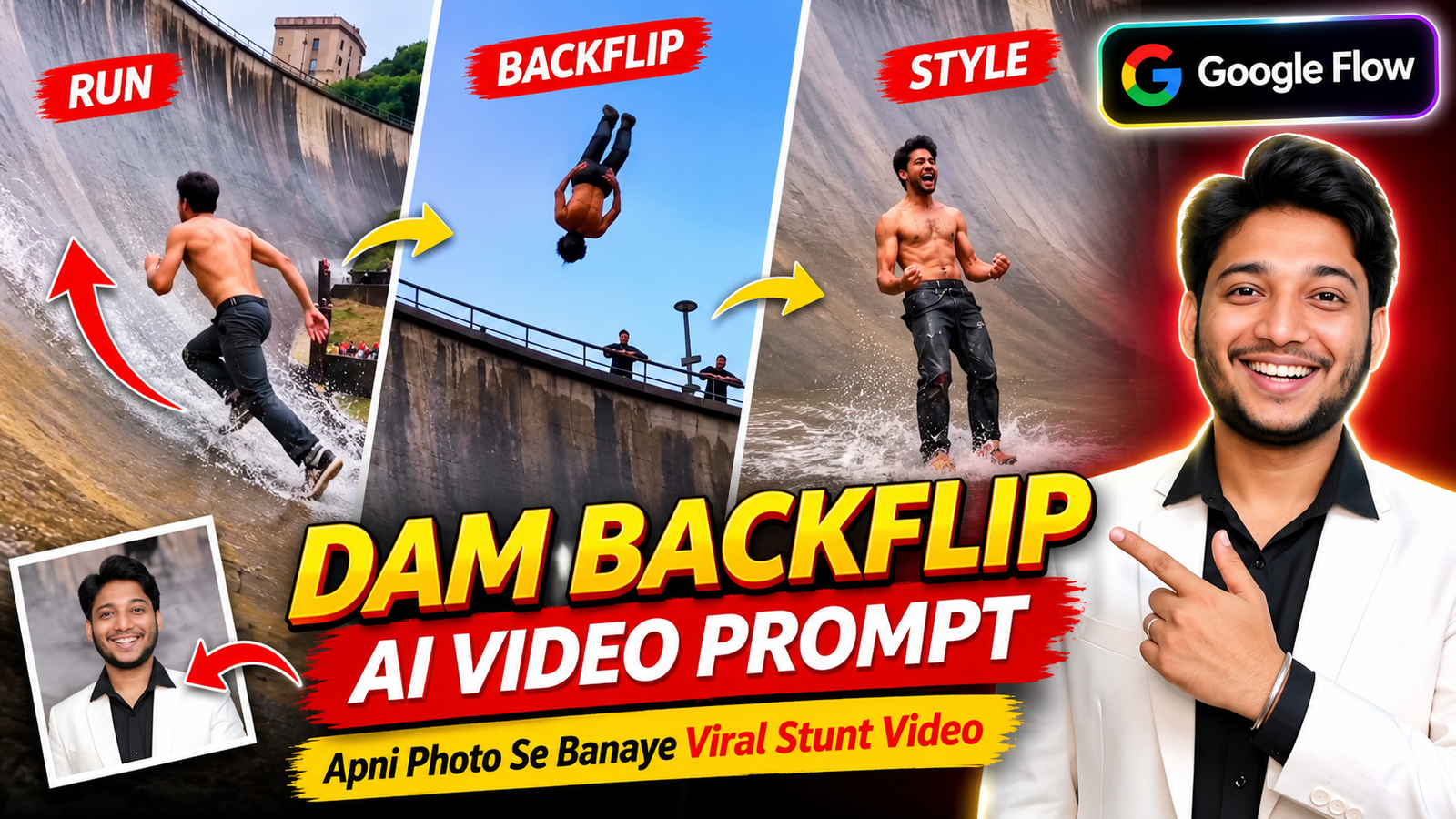
Aajkal Instagram Reels aur YouTube Shorts par ek alag hi tarah ke AI videos dekhne ko mil rahe hain. Inmein ek video kaafi interesting hai, jismein ek person tez daudte hue bade se curved dam ki deewar par chadhta hai, upar pahunchkar backflip karta hai aur phir stylish andaaz mein neeche aata hai. Video dekhkar pehli baar mein samajhna mushkil ho sakta hai ki ye real stunt hai ya AI-generated video.
Agar aap bhi apni photo se aisa hi Dam Backflip AI Video banana chahte hain, toh ye kaam AI video generator ki help se try kar sakte hain. Is tutorial mein hum Google Flow, Google Gemini aur Higgsfield ke baare mein samjhenge. Saath hi, aapko ek ready-to-use Google Flow Backflip Prompt bhi milega, jise copy karke apna video generate kar sakte hain.
Follow on InstagramDam Backflip AI Video Kya Hai?
Dam Backflip AI Video ek AI-generated stunt video hai. Ismein ek person ko bade curved dam ki surface par running karte hue dikhaya jata hai. Character tezi se upar ki taraf move karta hai, dam ke top par backflip karta hai aur phir dramatic landing ke saath video complete hota hai.
Is trend ki khaas baat ye hai ki aap apni photo ko AI character ke reference ke roop mein use kar sakte hain. Isi wajah se Photo To Backflip AI Video aur Dam Running AI Video jaise topics creators ke beech interesting ban rahe hain.
Google Flow, Gemini Aur Higgsfield Par Account Kaise Banayein?
Video generate karne se pehle aapko kisi AI tool par account banana hoga. Agar aap pehli baar AI video bana rahe hain, toh neeche diye gaye simple steps follow karein.
1. Google Flow Account Kaise Banayein?
- Sabse pehle Google Flow ki official website open karein.
- Sign In ya Get Started option par click karein.
- Apne Google Account se login karein.
- Login hone ke baad Google Flow ka interface open ho jayega.
- Ab aap new project start karke available video generation features use kar sakte hain.
Google Flow mein text prompt, images aur available reference assets ki help se video create kiya ja sakta hai. Features ki availability account aur region ke hisaab se different ho sakti hai.
2. Google Gemini Account Kaise Banayein?
- Google Gemini ki official website open karein.
- Sign In option par click karein.
- Apne Google Account se login karein.
- Login complete hone ke baad Gemini use karna start kar sakte hain.
Gemini ka use video ideas aur prompts prepare karne ke liye bhi kar sakte hain. Video generation ka option har account ya region mein available ho, ye zaroori nahi hai.
3. Higgsfield Account Kaise Banayein?
- Higgsfield ki official website open karein.
- Sign Up ya Get Started par click karein.
- Available registration option se account create karein.
- Email verification maangi jaye toh use complete karein.
- Login karne ke baad available AI video tools explore karein.
Account banane ke baad aap apni requirement ke hisaab se suitable AI video model select kar sakte hain.
Google Flow Se Dam Backflip AI Video Kaise Banayein?
Ab baat karte hain main process ki. Is tutorial mein Google Flow ka example le rahe hain, kyunki ismein prompt ke saath image references use karke video generate karne ke options milte hain.
Step 1: Google Flow open karke apne account se login karein.
Step 2: New Project start karein aur available video generation option select karein.
Step 3: Apni ek clear photo upload karein. Agar aapke selected model mein Ingredients ya image reference ka option hai, toh uska use karein.
Step 4: Ab neeche diya gaya AI Backflip Video Prompt copy karein aur prompt box mein paste karein.
Step 5: Video settings mein apni requirement ke hisaab se aspect ratio select karein.
Step 6: Available model aur generation settings check karke Generate par click karein. Video ready hone ke baad use preview karein.
Google Flow mein reference images aur videos ka support selected model aur feature ke hisaab se alag ho sakta hai. Isliye agar video reference ka option nahi milta, toh sirf apni photo aur text prompt se generation try karein.
Dam Backflip Video Ke Liye Best Photo Kaise Choose Karein?
Photo To AI Stunt Video banate waqt photo ka selection kaafi important hai. Agar aap blurred ya low-quality photo upload karenge, toh AI ko character ka appearance samajhne mein dikkat ho sakti hai.
- Clear aur high-quality photo use karein.
- Face par zyada shadow nahi honi chahiye.
- Full-body photo available ho toh use prefer karein.
- Sunglasses ya heavy filters wali photo avoid karein.
- Photo mein person clearly visible hona chahiye.
Ek achhi photo se character ki appearance maintain karne mein help mil sakti hai, lekin har frame mein exact face match hone ki guarantee nahi hoti.
Dam Backflip Video Ke Liye Best Aspect Ratio Kya Hai?
Video generate karne se pehle aspect ratio select karna bhi zaroori hai. Aap video ko kis platform par upload karna chahte hain, uske hisaab se ratio choose karein.
- 9:16 Vertical: Instagram Reels, YouTube Shorts aur Facebook Reels ke liye best choice hai. Is format mein video poori mobile screen par dikhta hai.
- 16:9 Horizontal: Agar aap normal YouTube video ya widescreen content banana chahte hain, toh ye ratio use karein.
- 1:1 Square: Square format Instagram feed posts ke liye use kar sakte hain.
Meri salah hai ki agar aapka target Instagram Reels ya YouTube Shorts hai, toh 9:16 ratio select karein. Isse aapka Dam Running AI Video mobile screen ke liye suitable rahega.
Dam Backflip AI Video Ke Liye Caption Ideas
Video ready hone ke baad use Instagram ya YouTube par upload karte waqt ek interesting caption bhi add karein. Yahan kuch caption ideas hain:
- AI ne toh impossible ko bhi possible bana diya! 😱
- Ye stunt real hai ya AI ka kamaal? 🤯
- Dam par aisa backflip kabhi dekha hai?
- Jab AI imagination ko reality jaisa bana de!
- Physics ko bhi sochne par majboor kar diya! 😂
Aap in captions ko apne video ke style ke hisaab se edit kar sakte hain.
AI Stunt Video Mein Song Kaise Add Karein?
Video generate hone ke baad aap usmein apni pasand ka background music add kar sakte hain. Iske liye CapCut ya kisi suitable editing app ka use karein.
Video import karein, music add karein aur backflip wale moment par song ki beat match karein. Isse final video dekhne mein aur engaging lagega.
Aap chahein toh bina audio ke video generate karke baad mein music add kar sakte hain. Ye aapki editing preference hai, Google Flow ki mandatory condition nahi.
Viral Dam Backflip Video Ke Liye Kuch Tips
- Prompt mein character ki movement clearly explain karein.
- Ek hi prompt mein bahut saare unrelated actions na likhein.
- Apni photo ki quality par dhyan dein.
- Video generate hone ke baad face aur body movement check karein.
- Reels aur Shorts ke liye vertical format choose karein.
- Video ko AI-generated content ke roop mein present karein, real stunt batakar viewers ko mislead na karein.
Dam Backflip AI Video Prompt – Copy And Paste
DURATION: 10 seconds. ASPECT RATIO: 9:16 vertical. ONE single continuous handheld take. No cuts, no transitions, no slow motion, no speed ramps. Real-time speed. VISUAL STYLE Photorealistic smartphone video filmed by a spectator in the crowd at a live outdoor event. Overcast grey sky, soft diffused daylight, no hard shadows, wet reflective concrete. Natural colours, realistic skin, realistic body physics and weight, natural handheld micro-shake. Not CGI, not cartoon, not cinematic grading. ONLY ONE MAIN PERSON. Other people exist only as small, generic background spectators. THE PERSON — @image1 @image1 is the ONLY identity reference. Exact same face, skin tone, facial structure, gender, age, body type and hairstyle as @image1 (same hair length, texture and colour — no hairstyle changes; hair may bounce naturally while running). Clothes, footwear and accessories come ONLY from @image1 and stay identical in every frame, including when tiny and far away. No added jewellery. Face clearly visible and recognizable in the first 0.7s and in the final close-up. LOCATION (fixed, never changes) – THE WALL: a gigantic curved concrete dam wall shaped like a huge concave half-pipe. At the bottom it starts almost flat, then curves up and becomes nearly vertical, about 40 m tall. Grey-beige concrete with a wet sheen, long faint vertical streak lines running up the curve, and dark water-stain drips hanging below the top rim. – THE RIM: along the top edge a long metal safety railing, a few tall lamp posts, and 4–6 small spectators standing behind the railing (silhouettes against the sky). – THE FLOOR: flat wet concrete at the base with thin water film and shallow puddles that reflect light. – SPECTATOR SIDE (right side of the start): a crowd of people in dark rain jackets standing behind low black barriers; above them a stepped concrete terrace with a row of red pop-up event tents (plain, NO logos, NO text), a green bushy hillside and a pale building at the very top. – Sky: flat overcast grey-white. CAMERA Handheld phone (~24mm main camera) held at eye height (~1.6 m) by a spectator standing at the base near the barrier, slightly right of THE PERSON’s running line. The camera operator stays in the same spot from 0 to 7.9s and only PANS/TILTS to follow THE PERSON (no zoom, no drone, no cut). From 7.9s THE PERSON comes to the camera, ending in a close-up. ACTION AND TIMING 0.00–0.70s: Medium-wide, slight rear 3/4 view from the right. THE PERSON stands at the start on the wet floor beside the crowd and barriers, facing the wall, bouncing lightly on the toes, shakes out the arms, leans forward and pushes off into a sprint. 0.70–1.40s: Explosive sprint away from the camera across the flat wet floor toward the wall; arms pumping; small splashes from the shoes. Camera pans left to follow; the crowd and red tents slide out of frame to the right. 1.40–3.50s: THE PERSON sprints UP the curving wall, getting smaller and smaller (from ~25% to ~8% of frame height). Camera tilts up steadily to keep them near the center. Long streak lines of the wall converge upward; a soft reflection/shadow follows under the feet. 3.50–4.90s: The wall is now nearly vertical; THE PERSON keeps running straight up the face with short powerful steps, body leaning into the wall. The top rim with the railing, lamp posts and small spectators enters the top of the frame with grey sky above. THE PERSON is tiny (~5% of frame height). 4.90–5.30s: Reaching the lip just below the railing, THE PERSON plants both feet and pushes off upward, flying above the rim, body silhouetted against the grey sky. 5.30–5.80s: In mid-air above the rim, THE PERSON does one clean backflip: knees tuck to chest, body rotates backward one full turn, then opens out upright with legs down. 5.80–6.40s: Lands feet-first back on the steep upper wall just below the rim and immediately starts running/sliding DOWN the wall toward the camera, knees bent, both arms spread wide for balance. Camera tilts down to follow. 6.40–7.90s: Fast controlled run down the curve straight toward the camera, arms out to the sides like wings, growing bigger in frame (from ~8% to ~45% of frame height), long reflection on the wet concrete. 7.90–8.30s: Reaches the flat wet floor at speed — a big white splash of water sprays up around the feet as they run through the puddle, slowing down with a few stomping steps. 8.30–9.20s: THE PERSON walks right up to the camera (close-up, chest-up, face sharp), wide-eyed, big open-mouth excited smile, points one finger straight at the camera, other hand clenched in a fist. 9.20–10.00s: Throws both fists high above the head in celebration, huge joyful smile, body bouncing with excitement. End on this celebration close-up. AUDIO Live event ambience if supported: crowd cheering and clapping that rises during the backflip and peaks at the splash, wet footsteps, water splash. No dialogue, no voice-over, no music with vocals, no words spoken — THE PERSON’s open mouth is an excited expression only, no speech. STRICT RULES / NEGATIVES – Do not change the face, hairstyle, gender, age or clothes from @image1 at any distance. – Only one runner on the wall. Spectators stay small, generic, behind barriers or the top railing; nobody else runs. – No ropes, harness, wires, safety gear, skateboard, bike or ladders — THE PERSON runs on their own feet. – The flip is a single backflip only — no extra spins, no falling, no injury, no crash. – THE PERSON never goes over the railing and never disappears behind the rim. – No cuts, no new location, no drone shot, no slow motion. – No text, captions, logos, brand names, banners with words, watermarks or subtitles anywhere (tents, barriers, clothes are plain). – No extra fingers, no distorted hands, limbs or face. FINAL RESULT One continuous 10-second handheld spectator video: THE PERSON from @image1 sprints across a wet floor, runs all the way up a giant curved concrete dam wall, launches off the top into a backflip against the grey sky, lands and runs back down with arms spread, splashes through the water at the bottom and celebrates right into the camera.

FAQs – Dam Running AI Video
Q1. Kya Dam Backflip AI Video mobile se bana sakte hain?
Haan, compatible mobile browser ya supported app ke through AI video generate karne ki koshish kar sakte hain. Features device aur account ke hisaab se different ho sakte hain.
Q2. Kya Dam Running AI Video banane ke liye reference video zaroori hai?
Nahi, agar selected model image reference aur text prompt support karta hai, toh aap apni photo aur prompt se bhi video generate kar sakte hain.
Q3. Instagram Reels ke liye kaunsa video ratio best hai?
Instagram Reels aur YouTube Shorts ke liye 9:16 vertical ratio suitable hai.
Final Words
Toh ab aap samajh gaye honge ki Google Flow AI Video Prompt ki help se apni photo ka use karke Dam Backflip jaisa AI stunt video kaise create kar sakte hain. Bas ek clear photo select karein, prompt ko sahi tarike se use karein aur final video ko upload karne se pehle check zaroor karein.
Aap bhi is Viral Dam Backflip Video trend ko try kar sakte hain aur apni creation Instagram Reels ya YouTube Shorts par share kar sakte hain.
