


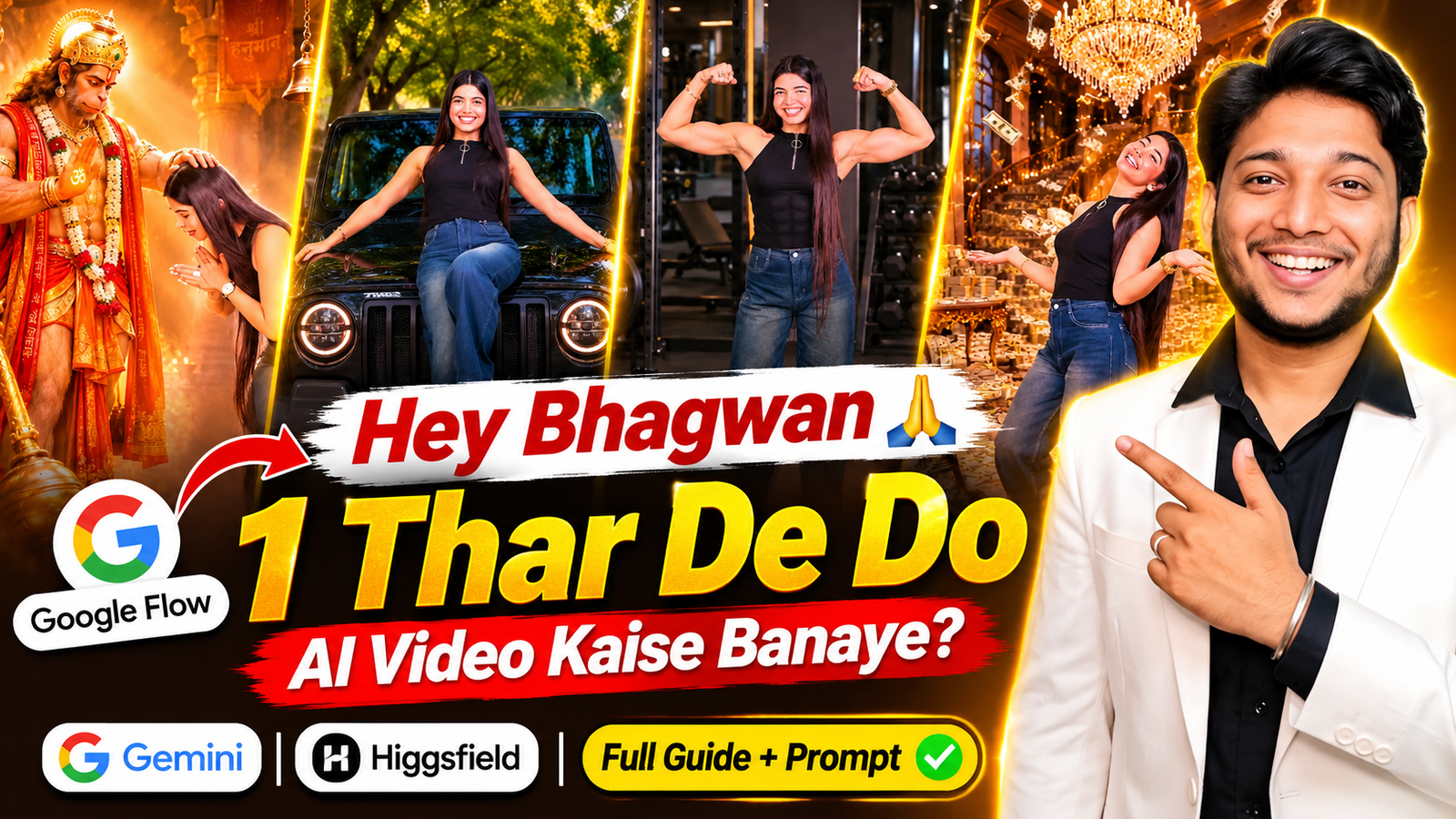
Aajkal Instagram Reels par ek funny AI video kaafi dekhne ko mil raha hai, jisme ek ladka ya ladki Bhagwan se apni wish maangte hue acting karta hai. Background mein “Hey Bhagwan, ek Thar de do” wali line chalti hai aur person usi ke hisaab se expressions deta hai. Jaise-jaise video aage badhta hai, waise-waise uski wishes poori hoti hui dikhai deti hain.
Kabhi person Bhagwan se Thar maangta hai, toh agle scene mein black Mahindra Thar ke saath khada nazar aata hai. Phir gym mein muscular body dikhata hai aur aakhir mein Bhagwan ke saamne haath jodkar thank you karta hai. Song ke saath scenes ka badalna hi is video ko funny aur interesting banata hai.
Agar aapne bhi Instagram par Hey Bhagwan 1 Thar De Do Video dekha hai aur soch rahe ho ki apni photo se aisa video kaise banaye, toh aapko khud camera ke saamne acting karke clips record karne ki zaroorat nahi hai. AI video tools ki madad se apni photo ko alag-alag scenes mein dikha sakte ho.
Is video ko banane ke liye Google Flow, Google Gemini aur Higgsfield jaise platforms ka use kar sakte ho. Har platform ka tarika thoda alag hai. Is article mein teeno ka process samjhaya gaya hai. Saath hi ek ready-made Google Flow AI Video Prompt bhi diya hai, jise copy karke apna video bana sakte ho.
Follow on InstagramHey Bhagwan 1 Thar De Do AI Video Kya Hai?
Ye ek funny AI video trend hai, jisme person Bhagwan se apni wish maangne ki acting karta hai. Video mein Thar, gym body aur Bhagwan ke saamne prarthana jaise scenes dikhaye jaate hain.
Aap bhi apni photo se khud ko in scenes mein dikha sakte ho. Jaise black Thar ke saath pose karna, gym mein fit body dikhana ya Bhagwan ke saamne haath jodna. Ladka ho ya ladki, dono is tarah ka Hey Bhagwan Thar AI Video bana sakte hain.
Apni Photo Se AI Video Banane Ke Liye Kya Chahiye?
Video banana shuru karne se pehle ye cheezein ready rakho:
- Apni Clear Photo: Aisi photo jisme aapka face saaf dikh raha ho.
- AI Video Platform: Google Flow, Gemini ya Higgsfield mein se koi ek.
- Google Account: Google ke tools mein login karne ke liye.
- AI Video Prompt: Neeche diya gaya prompt copy karna hai.
- Editing App: Song aur lyrics add karne ke liye VN Editor ya koi doosra app.
Koshish karo ki photo mein face saamne se dikh raha ho aur usmein blur ya bahut zyada filter na ho.
Google Flow AI Video Kaise Banaye?
Aise video banane ke liye aapke paas teen options hain: Google Flow, Google Gemini aur Higgsfield. Inmein se kisi ek platform ka use kar sakte ho.
1. Google Flow Se Thar AI Video Kaise Banaye?
Google Flow is video ke liye achha option hai, kyunki ismein text prompt ke saath image reference aur Ingredients ka use karke alag-alag scenes banaye ja sakte hain.
Steps:
- Google Flow open karke login karo.
- New Project start karo.
- Model menu se Video option select karo.
- Apni photo ko Ingredients ya supported image-reference option se upload karo.
- Neeche diya gaya Thar AI Video Prompt paste karo.
- 9:16 ratio aur available video settings select karo.
- Generate par click karo aur video ready hone ke baad download kar lo.
Agar chaar scenes ek saath sahi nahi bante, toh unhe alag-alag generate karo. Har scene mein wahi photo reference ke roop mein use karna, taaki character ka look milta-julta rahe.
2. Google Gemini Se AI Video Kaise Banaye?
Aap Google Gemini se bhi apni photo aur prompt ki madad se AI video bana sakte ho. Gemini mein Videos ya Create Video option open karo, apni photo upload karo aur scene ka prompt likho.
Steps:
- Gemini app ya website open karo.
- Videos ya Create Video option select karo.
- Apni photo upload karo.
- Thar, gym aur prayer wale scenes ka prompt paste karo.
- Submit par click karo aur video ready hone ka wait karo.
Gemini mein prompt ke through video mein changes bhi maang sakte ho. Dhyan rahe, personal account par video generation ke liye Google AI plan ki zaroorat ho sakti hai.
3. Higgsfield Se Photo Ko AI Video Kaise Banaye?
Higgsfield Image to Video bhi ek achha option hai. Ismein apni photo upload karke usmein movement add kar sakte ho. Aap prompt mein bata sakte ho ki person kya kar raha hai aur camera kis tarah move kare.
Steps:
- Higgsfield open karke login karo.
- Image to Video option select karo.
- Apni clear photo upload karo.
- Prompt mein person ka action aur background likho.
- Available model, duration aur video ratio select karo.
- Generate par click karke video download kar lo.
Kaunsa Platform Use Karein?
Agar aapko apni photo ke saath alag-alag scenes banane hain, toh Google Flow se shuru kar sakte ho. Gemini simple prompt se video banane aur changes karne ke liye useful hai. Higgsfield ek photo ko animate karne aur camera movement dene ke liye achha option hai.
Select the Right Video Size
- 9:16 Portrait: Instagram Reels, YouTube Shorts aur Facebook Reels ke liye.
- 16:9 Landscape: Normal YouTube videos ke liye.
Agar aapka main target Instagram hai, toh 9:16 ratio select karna.
Video Mein Lyrics Ke Saath Scenes Kaise Match Karein?
Is trend mein song aur lyrics ka bahut important role hai. Video download karne ke baad VN Editor open karo aur apne clips import kar lo.
Ab Audio option se suitable song add karo. Jaise hi “Thar de do” wali line aaye, usi waqt Thar wala scene dikhana. Gym wali line aaye toh gym ka scene lagana. Isse video zyada natural lagega.
Song use karte waqt copyright ka dhyan rakhna. Instagram ki music library mein available audio ka use bhi kar sakte ho.
AI Video Ka Result Achha Kaise Banaye?
- Hamesha apni clear photo upload karo.
- Prompt mein apna face same rakhne ki instruction do.
- Thar ka colour aur model clearly mention karo.
- Har scene mein same character rakhne ki baat likho.
- Video download karne se pehle face aur body movements check karo.
Caption Ideas for This AI Video
- Hey Bhagwan, bas ek Thar de do! 🙏
- Meri chhoti si wish list! 😂
- Thar bhi chahiye aur gym body bhi! 🔥
- Bhagwan meri wish kab poori hogi? ❤️
- AI ne meri wish ko video bana diya!
Hey Bhagwan 1 Thar De Do AI Video Prompt – Copy Karo
10 seconds, 9:16 vertical, realistic bright phone-camera look, sharp, vivid colors, real-time speed. FORMAT: THE PERSON dances happily in a plain lilac studio; every time they strike a pose, the video HARD-CUTS for a split second into their imagination — the SAME pose in a dream location — then cuts back to the studio. EXACTLY 12 SHOTS with hard cuts at 0.5s, 1.25s, 2.0s, 2.75s, 3.75s, 4.5s, 5.75s, 6.5s, 7.5s, 8.25s and 8.75s. The video OPENS directly on Shot 1 (the studio) — never a close-up portrait of @image1. @image1 is ONLY a face/outfit reference — never shown as a frame or as a photo in the video. THE PERSON = the person in @image1, the only human. Exact same face, gender, age, skin tone, hairstyle, hair length and body as @image1 in every shot — works the same for a man or a woman; never change the gender or hairstyle. Outfit exactly as in @image1 (if the lower body is not visible: dark blue wide-leg jeans and black sneakers); same outfit in all 12 shots, no jewelry added. MATCH-CUT RULE: each dream shot starts in EXACTLY the same pose, same body position, same size and same place in the frame as the last studio frame before it — only the background and the object around THE PERSON change. In dream shots THE PERSON holds the pose almost still, with only a small smile or laugh. CAMERA (all shots): invisible, locked-off, no movement, straight-on at chest height, about 3 m away, full body head to shoes, THE PERSON centered. THE STUDIO (Shots 1, 3, 5, 7, 9, 11 — always identical): smooth lilac-lavender painted wall; on the left a tall panel of vertical light-brown wooden slats with four thin vertical white LED light lines; glossy white tiled floor; a small white switch plate on the wall at the right; soft bright even light. Nothing else in the room. THE THAR: a glossy black MAHINDRA THAR (Indian 3-door off-road SUV) — NOT a G-Wagon, NOT a Jeep. Flat clamshell bonnet, black grille with six tall vertical slots, round LED-ring headlights touching the outer ends of the grille, no chrome, chunky black bumper with small square fog lamps, “THAR” in small silver capital letters on the right side of the bumper. THE LIMOUSINE: a long shiny white stretch limousine, slim LED headlights, chrome grille, many side windows, no logo, no badge. BOW POSE (used in Shots 1, 2, 3, 11 and 12 — always the same): THE PERSON stands in SIDE PROFILE facing the LEFT side of the frame (never facing the camera), feet on the ground, knees almost straight, bent forward at the hips about 70 degrees so the upper back is nearly horizontal and the head is low, face in profile looking down, eyes closed, both palms pressed together in namaste just in front of the nose, hair exactly as in @image1 (same length and style, never made longer), peaceful smile. A deep respectful bow — never a small nod, never standing upright, never sitting or kneeling. SHOT 1 — 0.0 to 0.5s — STUDIO: THE PERSON stands at center-left, body turned to the LEFT in side profile, laughing; 0.0–0.25s: claps both hands twice at chest height; 0.25–0.5s: bends forward into the full BOW POSE. SHOT 2 — 0.5 to 1.25s — HANUMAN TEMPLE (imagination): THE PERSON in the exact BOW POSE, standing at the RIGHT side of the frame, facing LEFT toward Lord Hanuman. CAMERA here a little closer: Hanuman’s full figure fills the LEFT 55% of the frame, his crown near the top edge and his feet near the bottom edge; THE PERSON’s full body on the right, the same size as in the studio. LORD HANUMAN: realistic, cinematic, STANDING tall in three-quarter view, body and face turned to the RIGHT toward THE PERSON, head tilted down, looking down at THE PERSON with a gentle, calm face. Tall ornate golden crown, red tilak, golden earrings, short beard, muscular bare chest with gold necklaces, a long garland of white jasmine and red roses, red shawl with ornate golden border over both shoulders hanging to the floor, orange-and-gold dhoti, gold armbands and bangles, bare feet. HIS LEFT ARM (the arm nearer THE PERSON) reaches forward and his LEFT PALM rests flat ON TOP of THE PERSON’s bowed head, fingers on their hair — clearly touching, held for the whole shot. HIS RIGHT HAND is raised at chest height, palm facing camera in blessing, with a softly glowing golden “ॐ” on the palm. A large shining golden gada (mace) stands at the lower left foreground: its big round head resting on the floor in front of his feet, its long handle leaning diagonally up against his right side. SETTING: INDOOR temple sanctum, warm dark golden-orange light, glowing golden haze and strong diagonal sun rays coming from the upper left. Behind them: tall carved golden stone pillars on the right and behind, a narrow vertical red cloth banner hanging between the two figures above head height with golden border and the golden Hindi text “जय श्री हनुमान” written in three stacked lines (जय / श्री / हनुमान), a big brass bell hanging on a chain at the upper right. Floor of warm stone scattered with orange marigold and red rose petals; a row of small lit clay diyas in the lower-left foreground. NO sky, NO open courtyard, NO temple domes, NO daylight outdoors. SHOT 3 — 1.25 to 2.0s — STUDIO: 1.25–1.5s: THE PERSON is still in the BOW POSE (continuing from Shot 2), smiling, palms joined; 1.5–1.75s: springs upright with a happy bounce, turning to face the camera, both palms flick open outward at chest height; 1.75–2.0s: arms open wide at shoulder height and the right knee lifts up high (standing on the left leg), big smile at camera. SHOT 4 — 2.0 to 2.75s — THAR (imagination): same arms-wide, right-knee-up pose, now SITTING on the middle of THE THAR’s bonnet, Thar parked head-on filling the frame width behind and below THE PERSON; arms stretched wide with hands resting on both edges of the bonnet, right foot raised up on the front bumper, left leg hanging down. Location: a straight road with tall green trees arching over it on both sides, warm golden-hour sunlight through the leaves. SHOT 5 — 2.75 to 3.75s — STUDIO: THE PERSON puts the foot down, laughs with mouth wide open, swings both arms playfully side to side, sways the hips; then puts the left hand behind the lower back, raises the right hand behind the head, tilts the head to the right and leans slightly to the left with a cute smile. SHOT 6 — 3.75 to 4.5s — LIMOUSINE (imagination): same pose — right hand behind the head, left hand behind the back — now leaning sideways with the right forearm resting on the front of THE LIMOUSINE, which stretches from the left edge of the frame into the background. Night street lined with trees and many warm yellow street-light bokeh dots, dark asphalt. SHOT 7 — 4.5 to 5.75s — STUDIO: THE PERSON dances with both hands on the waist, wiggles shoulders and hips, opens arms out, then raises both arms into a proud double biceps flex, fists near the ears, big grin. SHOT 8 — 5.75 to 6.5s — GYM (imagination): same double biceps flex, but THE PERSON’s arms are suddenly VERY muscular with big round biceps and shoulders (if @image1 has sleeves, the sleeves stay on, stretched tight over the muscles), and a defined six-pack outline shows through the top; proud grin. Dark modern gym: black power racks with thin yellow accent lines on both sides, rows of black dumbbells on racks behind, a bench at the back, dark rubber floor, dim warm lights. SHOT 9 — 6.5 to 7.5s — STUDIO: THE PERSON lowers the arms, does playful dance moves with arms swinging across the body; then leans back laughing with head tilted up, both arms open out to the sides, palms up. SHOT 10 — 7.5 to 8.25s — MONEY PALACE (imagination): same leaning-back laugh, arms open, palms up. Grand golden palace hall: huge crystal chandelier at top center, tall arched windows, a curved grand staircase behind covered in stacks of banknote bundles, golden carved table at the left, the whole floor covered in banknote bundles and loose notes, many loose notes falling through the air. SHOT 11 — 8.25 to 8.75s — STUDIO: THE PERSON turns to the LEFT into side profile, claps the palms together and bends forward into the full BOW POSE. SHOT 12 — 8.75 to 10.0s — LORD SHIVA (imagination): THE PERSON in the exact BOW POSE at the RIGHT side of the frame, facing LEFT toward Lord Shiva, held to the end. Same closer camera as Shot 2. Night forest temple, realistic and cinematic: a huge glowing full moon at the top, purple-blue night sky, a waterfall in the background, small brass bells and flowers hanging from branches, warm diya glow lighting the figures. LORD SHIVA: realistic, cinematic (not cartoon, not bright blue): ash-grey skin, SEATED on a large rock covered with a leopard-print cloth on the LEFT 55% of the frame, body and face turned in three-quarter view to the RIGHT toward THE PERSON, NOT cross-legged in meditation — one leg hangs down from the rock; head tilted down, gentle face looking at THE PERSON. Matted hair in a tall bun with a small crescent moon, three white lines on the forehead, rudraksha bead necklaces, a calm grey cobra coiled around his neck. HIS LEFT PALM rests flat ON TOP of THE PERSON’s bowed head (clearly touching); HIS RIGHT HAND is raised at chest height, palm facing camera in blessing, with a softly glowing golden “ॐ” on the palm. A tall trident with a small damaru and red cloth behind him at the upper left. A white Nandi bull with a garland in the background at the right. Lower-left foreground: a black stone Shiva lingam with three white lines, a lit brass diya and pink lotus flowers. AUDIO: upbeat happy instrumental music with a strong beat, a soft whoosh on each cut into a dream shot, a temple bell in Shot 2, a soft conch-like hum in Shot 12. No dialogue, no voice, no singing, no lip-sync. STRICT RULES — follow the prompt literally: – Generate ONLY what is written. Do not add any object, person, vehicle, prop, effect, text or action that is not described. Do not skip, merge or reorder any shot. – No other humans anywhere (no bystanders, drivers, gym people, reflections). Lord Hanuman appears only in Shot 2, Lord Shiva only in Shot 12. – Every studio shot is the same lilac studio; every dream shot is a hard cut (no fades, no morphing, no zoom). – Dream shots keep THE PERSON’s exact pose from the studio frame before them. In Shots 2 and 12 THE PERSON is in the deep BOW POSE in side profile with the god’s palm resting on their head — never standing upright, never facing the camera. – Only allowed text: “जय श्री हनुमान” on the temple banner, the “ॐ” on the two blessing palms, and “THAR” on the Thar’s bumper. No captions, emojis, logos, watermarks. – The Thar never looks like a G-Wagon or Jeep and never has chrome. The limousine has no logo. – Gym: muscles grow cleanly — no veins, no torn clothes. – No tripod, phone, camera or equipment visible. No camera movement. Same face, hair and outfit in every shot..

Important Note: Google Flow se generate kiya gaya video mute ho sakta hai. Isliye pehle reference video ko download karke uska audio alag se nikal lo. Ab kisi bhi video editing app (jaise VN Editor) mein Google Flow wala video aur nikala hua audio add karke dono ko sync kar do. Bas, aapka final video ready hai! 🎬
Frequently Asked Questions (FAQ)
Q1. Hey Bhagwan 1 Thar De Do Video Kaise Banaye?
Google Flow, Gemini ya Higgsfield mein apni photo upload karo, prompt paste karo aur video generate kar lo.
Q2. Kya Ladki Bhi Ye AI Video Bana Sakti Hai?
Haan, ladka ya ladki koi bhi apni clear photo upload karke is tarah ka AI video bana sakta hai.
Q3. Kya Google Flow Se Free Mein AI Video Bana Sakte Hain?
Google Flow mein free usage ki limit account aur current plan ke hisaab se alag ho sakti hai.
Q4. Kya Video Mein Apna Song Add Kar Sakte Hain?
Haan, VN Editor ya kisi doosre editing app mein apna song aur lyrics add kar sakte ho.
Final Words
Toh dosto, ab aap samajh gaye hoge ki Google Flow, Gemini aur Higgsfield ki madad se Hey Bhagwan 1 Thar De Do AI Video kaise bana sakte ho.
Meri salah hai ki pehle Google Flow se try karo. Apni clear photo upload karo, prompt paste karo aur 9:16 ratio select karke video generate kar lo. Agar saare scenes ek saath sahi nahi bante, toh unhe alag-alag banakar editing app mein jod sakte ho.
Aakhir mein song add karo aur apni Reel Instagram par share kar do.
Trending Keywords
- Hey Bhagwan 1 Thar De Do Video
- Hey Bhagwan Thar AI Video
- 1 Thar De Do AI Video
- Hey Bhagwan AI Video
- Google Flow AI Video Prompt
- Thar AI Video Prompt
- Apni Photo Se AI Video Kaise Banaye
- AI Video With Own Photo
- Google Flow Photo to Video
- Viral Instagram AI Video
- Bhagwan Thar De Do Reel
- Thar Viral Reel
- AI Video Prompt Hind
