


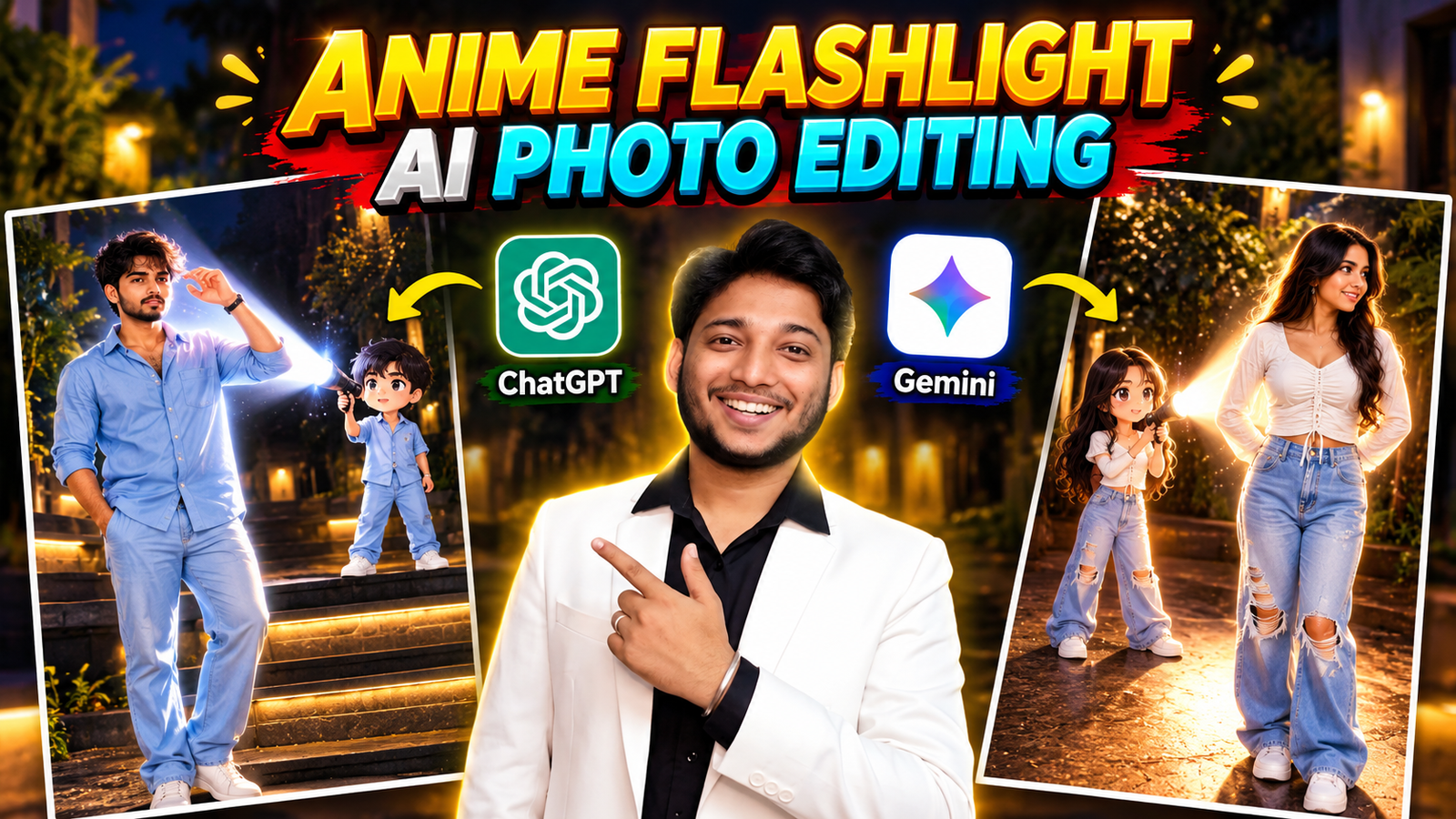
Aajkal AI photo editing mein har kuch din mein koi na koi naya trend dekhne ko mil jata hai. Kabhi normal photo ko cartoon look diya ja raha hai, kabhi photo ke andar 3D character add ho raha hai aur kabhi ek real photo ko completely different cinematic scene mein convert kar diya jata hai.
Abhi Anime Flashlight AI Photo ka concept bhi kaafi interesting lag raha hai. Is type ki photo mein ek real person normal photo mein khada hota hai aur uske peeche uska hi ek chhota anime version flashlight lekar khada hota hai.
Sabse interesting part ye hai ki anime character ki flashlight ki light real person par padti hui dikhai deti hai. Is wajah se photo dekhne mein kaafi creative lagti hai, jaise real world aur anime world ko ek hi photo mein mix kar diya gaya ho.
Aapne social media par is type ki photos dekhi hongi, jahan kisi boy ya girl ke peeche uska mini anime character khada hota hai. Kabhi wo flashlight pakadta hai, kabhi phone aur kabhi koi funny reaction deta hai.
Agar aap bhi apni photo se isi type ka edit banana chahte ho, to Photoshop jaise complicated software ki zarurat nahi hai. ChatGPT aur Google Gemini jaise AI tools se bhi aap is idea ko try kar sakte ho.
Is article mein main isi Anime Flashlight AI Photo Editing Prompt 2026 ko step-by-step explain karunga aur saath mein ready-to-use prompt bhi dunga.
Follow on InstagramAnime Flashlight AI Photo Editing Kya Hai?
Simple words mein, is trend mein aapki normal photo ke andar aapka mini anime version add kiya jata hai.
Maan lo aap stairs par khade ho. AI aapko same rakhega aur aapke peeche ek chhota anime character add karega jo aapke hairstyle, outfit aur overall look se inspired hoga.
Us anime character ke haath mein flashlight hogi aur wo flashlight ki light aapke shoulder ya back par daalta hua dikhega.
Flashlight ke alawa aap mini character ko phone pakde hue, camera se photo lete hue ya koi funny reaction dete hue bhi bana sakte ho.
How to Create a Anime Flashlight AI Photo?
Ab baat aati hai ki ye photo banayenge kahan se aur shuru kaise karenge.
Agar aapne pehle kabhi ChatGPT ya Gemini use nahi kiya hai, to tension lene ki zarurat nahi hai. Pehle inmein se kisi ek platform par account bana lo. Account ready hone ke baad hi aap apni photo upload karke AI editing try kar paoge.
ChatGPT Account Kaise Banaye?
Agar ChatGPT use karna hai, to ChatGPT open karo.
- Sign Up ya Create Account option par tap karo.
- Google account se continue karna usually sabse easy option hota hai.
- Account create hone ke baad ChatGPT mein login kar lo.
- Ab chat screen par jaakar image upload karne ka option check karo.
- Photo upload karke apni requirement prompt mein likh sakte ho.
ChatGPT mein existing photo upload karke usmein changes karne ka option available hai. Aap kisi specific part ko change karne ke liye bhi instruction de sakte ho. (OpenAI Help (OpenAI Help Center))
Agar aapke paas pehle se ChatGPT account hai, to ye steps dobara karne ki zarurat nahi hai.
Google Gemini Account Kaise Banaye?
Agar Gemini use karna hai, to Google Gemini open karo.
- Apne Google account se sign in karo.
- Agar Google account nahi hai, to pehle ek Google account create karna hoga.
- Login ke baad Gemini ka chat page open ho jayega.
- Yahan photo upload karne ka option use karo.
- Photo upload karne ke baad prompt paste karke editing try kar sakte ho.
Gemini mein photo upload karke uske saath prompt dene aur image edit karne ka option available hai. (Google Gemini Help (Google Help))
Ab Anime Flashlight AI Photo Banaye
Account ready hone ke baad aap ChatGPT ya Google Gemini, kisi bhi platform par ye photo try kar sakte ho.
Sabse pehle ek clear photo select karo. Agar full-body result chahiye to full-body photo use karna better rahega. Face clearly visible ho aur photo bahut blurry na ho.
Photo upload karo aur neeche diya gaya prompt paste kar do.
Agar aap ChatGPT use kar rahe ho, to image upload karke directly bata sakte ho ki usmein kya change chahiye. Gemini mein bhi uploaded photo ke saath editing prompt diya ja sakta hai. (ChatGPT Image Guide (OpenAI Help Center)) (Gemini Image Editing Guide (Google Help))
ChatGPT Se Anime Flashlight Photo Kaise Banaye?
ChatGPT open karo aur apni clear photo upload karo.
Ab prompt paste kar do aur image generate hone do.
Agar first result mein anime character bahut bada ho gaya ya flashlight galat direction mein hai, to poora prompt dobara likhne ki zarurat nahi hai.
ChatGPT mein generate hone ke baad bhi image ko dobara edit karne ke liye follow-up instruction diya ja sakta hai. (OpenAI Help (OpenAI Help Center))
Google Gemini Se Anime Flashlight Photo Kaise Banaye?
Google Gemini open karo, apni photo upload karo aur same prompt paste kar do.
Agar tumhare paas koi reference photo hai, to use bhi upload karke bata sakte ho ki anime character ki position, size aur flashlight effect reference jaisa chahiye.
Google ke current instructions ke according, Gemini mein existing image upload karke usmein changes ke liye prompt diya ja sakta hai. (Google Gemini Help (Google Help))
Agar result mein face ya clothes thode change ho rahe hain, to prompt mein clearly bol dena ki original look bilkul same rakhe.
Anime Flashlight AI Photo Editing Prompt
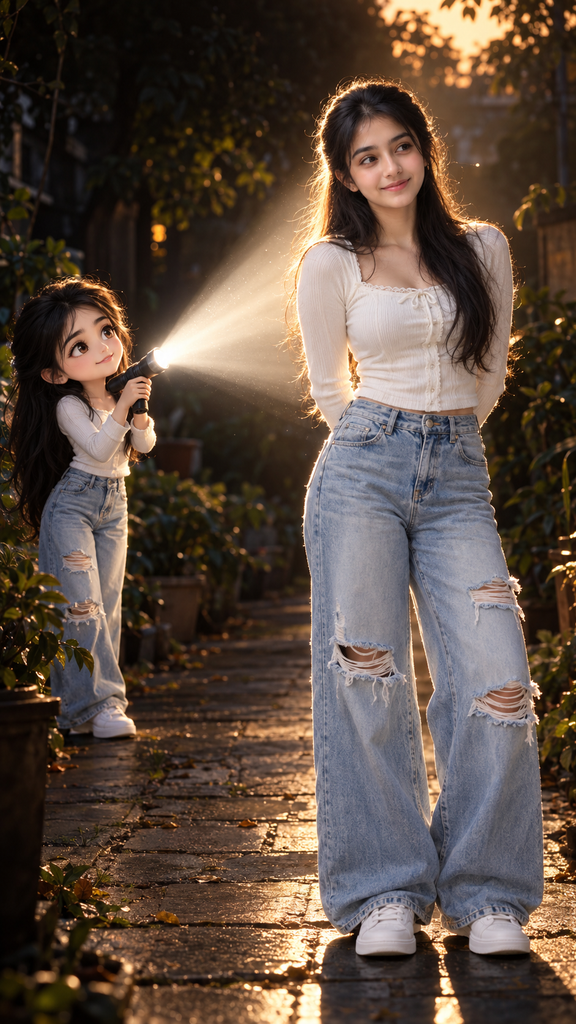
Use the uploaded girl photo as the exact identity reference. Preserve her face, facial features, skin tone and natural appearance. Create a photorealistic cinematic 9:16 full-body portrait of the same girl standing confidently in a slightly dark outdoor garden walkway during golden hour. She wears a stylish premium white fitted long-sleeve top with elegant details, wide-leg light blue ripped jeans and white sneakers. Her pose should look natural and graceful: both hands placed casually behind her back/around her waist, shoulders relaxed, body slightly turned, looking toward the side with a subtle smile. Behind her on the left, place a small high-quality 3D anime/chibi version of the same girl, holding a realistic flashlight and pointing it directly at the real girl. The flashlight creates a powerful bright white beam hitting her body, with strong glowing rim light around her hair and shoulders. IMPORTANT: Keep the surrounding background noticeably dark and slightly shadowy so the flashlight beam and glow stand out dramatically. Add realistic volumetric light, atmospheric particles, cinematic shadows and natural reflections. The anime character must look naturally present in the scene, not pasted or floating. Ultra-realistic photography, cinematic depth of field, realistic skin, hair and clothing, premium fashion aesthetic, no text, no watermark.
 ChatGPT

Use the uploaded girl photo as the exact identity reference. Preserve her face, facial features, skin tone and natural appearance. Create a photorealistic cinematic 9:16 full-body portrait of the SAME GIRL standing on a narrow garden pathway surrounded by dense dark green foliage and beautiful red-pink bougainvillea flowers. She is wearing a premium elegant pastel peach/powder-blue embroidered kurti with delicate traditional detailing, straight-fit matching pants and stylish ethnic footwear. The outfit should look modern, graceful and premium. Change the pose completely: she is standing naturally with one hand gently holding a small flower near her chest and the other hand relaxed beside her body. Her body is slightly turned and she is looking downward with a soft natural smile. Behind her on the left, place a small 3D anime/chibi version of the same girl, holding a realistic flashlight and pointing it toward the real girl. The flashlight creates a strong bright white beam across the darker environment, producing dramatic glowing rim light around her hair and shoulders. Keep the background noticeably dark and cinematic so the flashlight beam is clearly visible. Add realistic volumetric light, subtle floating dust particles, deep shadows, warm highlights and natural ground shadows. The anime character must look naturally integrated into the scene, not pasted or floating. Photorealistic, cinematic photography, realistic skin and fabric texture, shallow depth of field, premium fashion/editorial look, dramatic lighting, ultra detailed, no text, no watermark. Aspect ratio: 9:16.
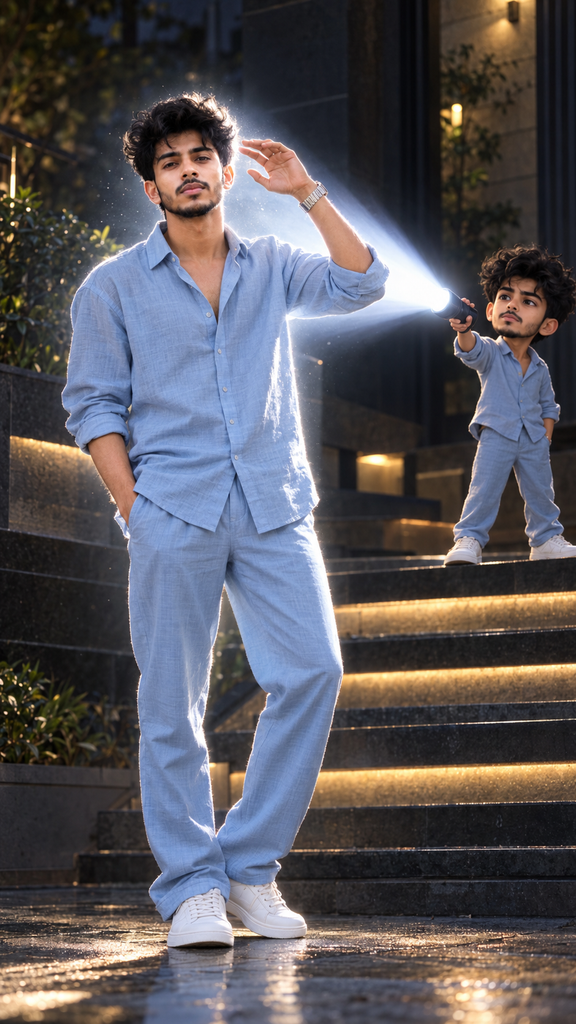
Use the uploaded male photo as the exact identity reference. Preserve his face, facial features, skin tone, hairstyle and natural appearance. Create a photorealistic cinematic 9:16 full-body portrait of the SAME MAN standing in a slightly dark outdoor urban setting beside a modern staircase. He is wearing a stylish premium light-blue oversized linen/cotton shirt with the sleeves casually rolled up, relaxed-fit light-blue trousers and clean white sneakers. His pose should look natural and confident: one hand casually in his trouser pocket while the other hand is slightly raised near his head, as if reacting to the bright light. Behind him, slightly to the right, place a small high-quality 3D anime/chibi version of the SAME MAN. The anime boy is holding a realistic flashlight and pointing it directly toward the real man. The flashlight produces an extremely bright white beam hitting the real man, creating strong glowing rim light around his hair, shoulders and body. Keep the environment slightly dark so the flashlight beam is clearly visible. Add realistic volumetric light, cinematic shadows, subtle atmospheric particles and natural reflections. The anime character must look naturally integrated into the scene, not pasted or floating. Ultra-realistic photography, cinematic depth of field, realistic skin and clothing texture, premium editorial style, dramatic lighting, full-body composition, 9:16 vertical, no text, no watermark. Aspect ratio: 9:16.

Use the uploaded male photo as the exact identity reference. Preserve his face, facial features, skin tone, hairstyle and natural appearance. Create the same cinematic 9:16 full-body scene with the real man in the foreground, wearing the same stylish white shirt, dark wide-leg trousers and white sneakers. Keep the same dark luxury outdoor garden/entrance background, pillars, plants, dramatic lighting and overall composition. Behind him, place a MEDIUM-SIZED anime version of the same man, around 45–55% of the real man’s height — not too large and not tiny. IMPORTANT: The character must look unmistakably like a TRUE ANIME CHARACTER, not a realistic human and not merely a cartoonized person. Use a polished Japanese anime aesthetic with clearly stylized anime facial features, large expressive anime eyes, clean sharp anime linework, stylized spiky/soft anime hair, simplified anime proportions and high-quality anime-film rendering. The anime boy is holding a flashlight and pointing it directly at the real man. The flashlight creates a powerful bright white beam across the real man’s body with strong glowing rim light around his hair and shoulders. Keep the background dark so the flashlight beam stands out clearly. Add realistic volumetric light, atmospheric particles, cinematic shadows and natural reflections. The anime character must be naturally positioned on the ground behind the man with realistic contact shadow, but remain clearly anime-styled. Photorealistic real man + unmistakable Japanese anime character, cinematic lighting, premium photography, realistic textures, dramatic contrast, full body, 9:16, no text, no watermark. Aspect ratio: 9:16.

Use the uploaded female photo as the exact identity reference for the REAL GIRL. Preserve her exact face, facial features, skin tone, hairstyle and natural appearance. Create a photorealistic cinematic 9:16 full-body portrait matching the reference composition very closely. The real girl stands in the foreground on a paved outdoor garden walkway. She wears a fitted elegant white long-sleeve ruched top, light-wash wide-leg ripped jeans and clean white sneakers. Her pose is natural and confident: both hands placed casually behind her waist/back, shoulders relaxed, body slightly turned, looking toward the side with a soft subtle smile. Behind her on the LEFT side, place a medium-sized miniature anime version of the SAME GIRL, around 45–50% of the real girl’s height. The anime character is standing naturally on the ground and holding a realistic flashlight with both hands, pointing it directly toward the real girl. IMPORTANT — ANIME CHARACTER: Make the character unmistakably a TRUE JAPANESE ANIME / CHIBI CHARACTER, NOT a realistic human and NOT a semi-realistic cartoon. Large expressive anime eyes, clearly stylized anime face, small cute nose and mouth, stylized flowing anime hair, slightly oversized anime head, clean anime proportions, polished high-quality Japanese animation aesthetic, detailed 3D anime rendering. The anime girl should wear a cute miniature version of the same white top, light-blue jeans and white sneakers. The flashlight produces an extremely bright warm-white beam aimed directly at the real girl, creating a strong glowing rim light around her hair, shoulders and body. The beam should be clearly visible in the air. Keep the background slightly dark and cinematic with trees, foliage, stone walls and warm golden-hour light. The darker surroundings should make the flashlight beam and glowing outline stand out strongly. Realistic shadows, volumetric light, subtle atmospheric particles, natural ground shadows, cinematic depth of field, beautiful golden backlight, premium fashion photography. The real girl must remain completely photorealistic while the clone remains clearly anime-styled. No extra people, no distorted hands, no floating character, no pasted/sticker appearance, no text, no watermark. 9:16 vertical, ultra-detailed, cinematic, photorealistic real person + high-quality Japanese anime character. Aspect ratio: 9:16.
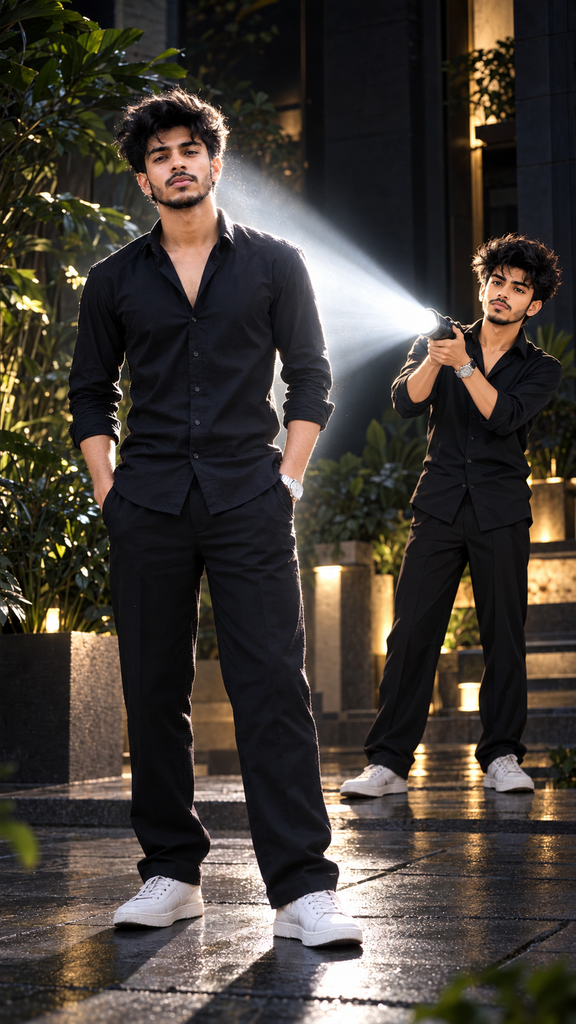
Use the uploaded real-person photo as the PRIMARY IDENTITY REFERENCE. Create a photorealistic cinematic 9:16 full-body portrait of the SAME PERSON from the uploaded photo. Preserve the person’s exact facial identity, hairstyle, skin tone, body proportions and natural appearance. Keep the overall composition similar to the reference: the real person stands prominently in the foreground in a dark cinematic outdoor garden/entrance setting, while a medium-sized anime version stands behind them slightly to the side and shines a powerful flashlight directly toward the real person. IMPORTANT — ANIME CLONE: Create a TRUE high-quality Japanese anime character based specifically on the uploaded person. The anime character must clearly resemble the SAME PERSON: – same hairstyle and hair direction – same hair color – same outfit design and colors – same overall body silhouette – same recognizable facial characteristics translated into anime – same overall personality and appearance The anime character must look like an actual polished anime character, with expressive large anime eyes, stylized anime facial features, clean anime linework, anime-style hair and proportions. Do NOT make it photorealistic, semi-realistic, or merely a cartoon filter. The anime character should be MEDIUM-SIZED, approximately 45–55% of the real person’s height — clearly visible but not oversized or tiny. The anime character holds a realistic flashlight with both hands and points it directly at the real person. Create a powerful bright white flashlight beam with visible volumetric light, illuminating the real person’s body and producing a strong glowing rim light around their hair and shoulders. Keep the environment dark and cinematic so the flashlight beam is highly visible. Add deep shadows, atmospheric particles, realistic ground shadows and cinematic contrast. The anime clone must be naturally standing on the ground with proper contact shadows and must look physically present in the same scene. Photorealistic real person + unmistakable Japanese anime clone, cinematic lighting, ultra-detailed, realistic textures, dramatic flashlight glow, premium photography, 9:16 vertical, no text, no watermark.
Mini Anime Character Apne Jaisa Kaise Banaye?
Kabhi-kabhi AI anime character bana deta hai, lekin wo original person jaisa nahi lagta.
Aisa ho to prompt mein ye line add kar do:
Make the small anime character a recognizable miniature anime version of the same person, keeping the same hairstyle, facial features, skin tone, outfit colors and overall appearance in a cute anime style.Isse AI ko clear ho jayega ki random anime character nahi banana hai, balki same person ka mini anime version banana hai.
Flashlight Effect Realistic Kaise Banaye?
Agar flashlight sirf ek white line jaisi dikh rahi hai, to ye instruction try karo:
Create a bright realistic flashlight beam with soft atmospheric glow, subtle light particles and natural light falloff on the real person's body.Isse flashlight ka effect scene ke saath zyada naturally blend ho sakta hai.
Face Change Ho Raha Hai To Kya Karein?
AI editing mein kabhi-kabhi original face thoda change ho jata hai.
Agar aisa ho raha hai, to ye line add karo:
Preserve the exact facial identity of the real person from the uploaded photo. Do not beautify, reshape or redesign the face.Aur agar clothes change ho rahe hain:
Keep the exact same clothing, colors, patterns and overall outfit from the original photo.Select the Right Image Size
Agar photo ko Instagram Story, Reel ya YouTube Shorts mein use karna hai, to 9:16 vertical format rakhna better rahega.
Instagram feed ke liye 4:5 bhi use kar sakte ho.
Agar website article ke liye image bana rahe ho, to portrait format rakhna useful rahega, especially mobile users ke liye.
ChatGPT mein image generate karte waqt aspect ratio choose karne ka option bhi available hai, isliye final use ke according format select kar sakte ho. (OpenAI Help (OpenAI Help Center))
Photo Generate Karne Ke Baad Ye Check Karna
Photo ready hone ke baad ek baar zoom karke dekh lena.
Especially in cheezon ko check karo:
- Face same hai ya nahi
- Anime character ka size natural hai ya nahi
- Flashlight sahi direction mein hai ya nahi
- Light person par properly pad rahi hai ya nahi
- Hands aur fingers theek hain ya nahi
- Background unnecessarily change to nahi hua
- Koi extra person add to nahi hua
Kuch galat lage to same image ko correction prompt ke saath dobara edit karwa sakte ho.
Caption Ideas for This AI Photo
Photo ready hone ke baad caption bhi thoda fun rakh sakte ho.
“POV: Mera mini version bhi mere peeche aa gaya 😂”
“Real Me + Mini Me 😂”
“AI ne mera chhota version bana diya 😂🔥”
“Who turned on the flashlight? 👀😂”
“Mera anime version mujhse bhi zyada active hai 😂”
Final Words
To bhai, Anime Flashlight AI Photo Editing Prompt 2026 ek simple aur creative AI photo idea hai jise aap apni normal photo ke saath try kar sakte ho.
Isme sabse interesting part ye hai ki aap apni photo ke andar apna hi ek mini anime version add kar sakte ho aur usse flashlight, phone, camera ya kisi funny pose ke saath use kar sakte ho.
Aap ChatGPT ya Google Gemini mein apni photo upload karke upar diya hua prompt try karo. Agar first result perfect nahi aaye, to poora prompt change karne ki zarurat nahi hai. Bas jis cheez mein problem aa rahi hai, uske liye chhota correction prompt de do.
Aur agar kisi doosre person ki photo use kar rahe ho, to photo use karne ki permission aur privacy ka dhyan zaroor rakho.
Agar aap ye article website par publish kar rahe ho, to apne actual generated photos, screenshots aur khud ke tips bhi add karna. Isse reader ko prompt ke saath practical example bhi milega aur article zyada useful lagega. Google ki current Search guidance bhi original, helpful aur people-first content par focus karne ko kehti hai. (Google Search Central (Google for Developers))
Trending Keywords
- Anime Flashlight AI Photo Editing Prompt 2026
- Anime Flashlight AI Photo
- Anime AI Photo Editing Prompt
- AI Photo Editing Prompt 2026
- ChatGPT Photo Editing Prompt
- Gemini AI Photo Editing Prompt
- Viral AI Photo Editing
- AI Photo Editing Prompts 2026
- Anime Photo Editing Prompt
- Mini Anime Character AI Photo
