


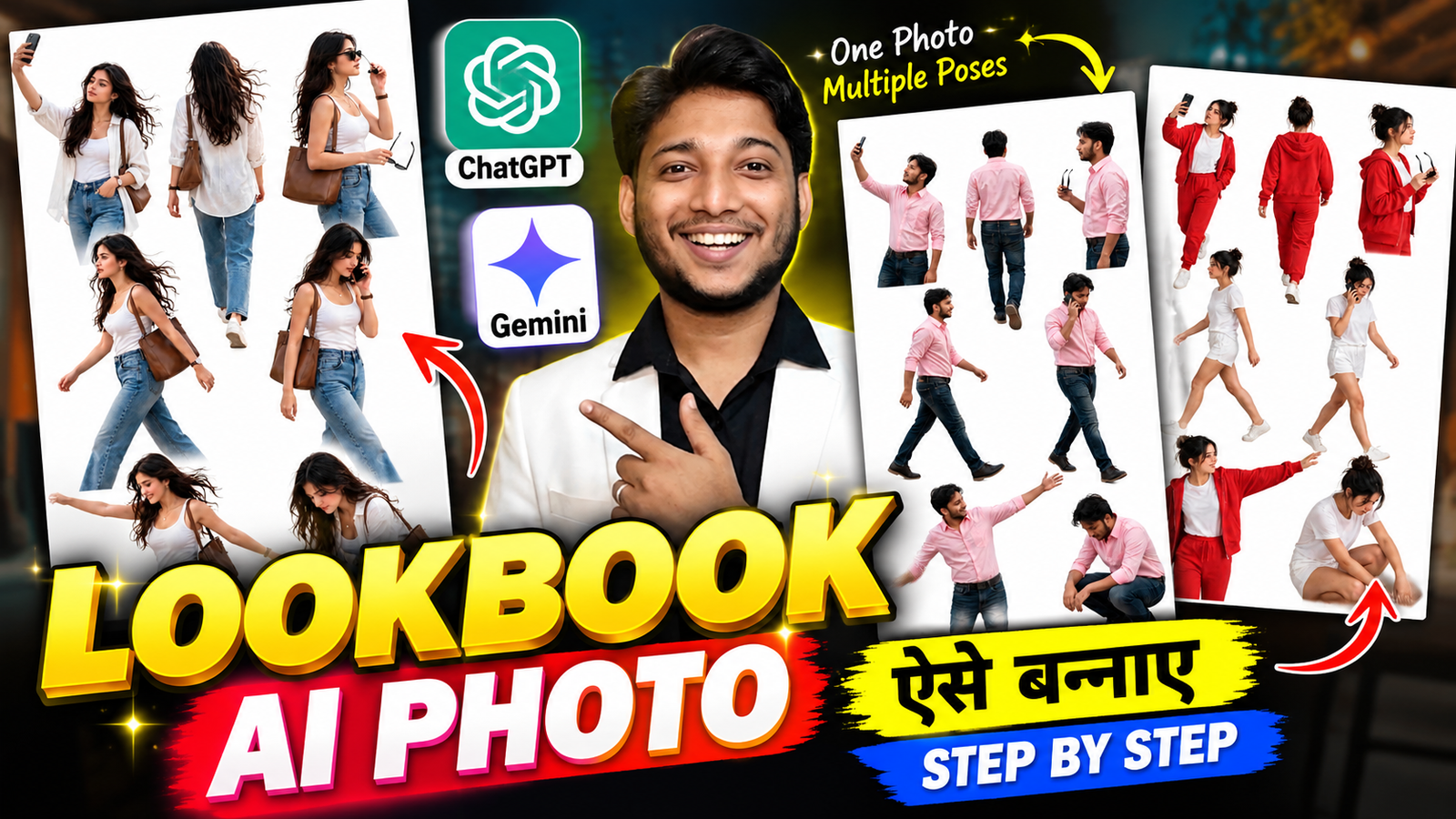
Aajkal Instagram par aisi photos dekhne ko mil rahi hain, jinmein ek hi person ke alag-alag poses ek saath dikhai dete hain. Kahin selfie lete hue, kahin walking karte hue, toh kahin sunglasses ke saath stylish look mein. Sabhi poses ko ek hi image mein arrange kiya jata hai, jisse poori photo ek professional fashion photoshoot jaisi lagti hai.
Agar tum bhi apni normal photo se aisa Lookbook AI Photo banana chahte ho, toh tumhe alag-alag photos khinchwane ki zaroorat nahi hai. AI tools ki help se tum apni ek photo upload karke multiple poses wala collage bana sakte ho.
Iske liye ChatGPT aur Google Gemini jaise platforms use kar sakte ho. Is article mein hum account banane se lekar photo generate karne tak ka process samjhenge. Saath hi, tumhe ek Lookbook AI Photo Editing Prompt 2026 bhi milega, jise copy karke apni photo ke saath use kar sakte ho.
Follow on Instagram1. Lookbook AI Photo Kya Hai?
Lookbook AI Photo ek aisa collage hota hai, jisme ek hi person ke alag-alag poses ek image mein dikhaye jaate hain. Jaise selfie lena, sunglasses pakadna, walking karna ya casually baithna.
AI ki help se tum apni ek photo ko reference banakar aisa look create kar sakte ho. Is tarah ki images Instagram posts, stories aur fashion-related content ke liye useful hain.
2. ChatGPT Se Lookbook AI Photo Kaise Banaye?
Lookbook AI Photo banane ke liye ChatGPT aur Google Gemini dono try kar sakte ho. Agar tum pehli baar in tools ka use kar rahe ho, toh pehle apna account ready kar lo.
ChatGPT Aur Gemini Par Account Kaise Banaye?
ChatGPT Account:
- ChatGPT ki official website open karo.
- Sign Up par click karo.
- Email ya available Google sign-in option se account banao.
- Screen par diye gaye instructions follow karke setup complete kar lo.
Google Gemini Account:
- Google Gemini open karo.
- Apne Google Account se sign in karo.
- Agar account nahi hai, toh Google Account signup page par jaakar bana sakte ho.
- Login karne ke baad image generation ka option check karo.
ChatGPT Se AI Lookbook Photo Banao
- ChatGPT open karo aur apni clear photo upload karo.
- Neeche diya gaya Lookbook AI Photo Editing Prompt copy karo.
- Prompt ko apni photo ke saath send kar do.
- Image generate hone ke baad check karo ki saare poses sahi dikh rahe hain ya nahi.
Google Gemini Se Lookbook Photo Banao
Gemini mein sign in karne ke baad apni photo upload karo aur lookbook prompt enter karo. Gemini ke image-generation feature se tum photo edit karne aur naye poses wala collage banane ki koshish kar sakte ho. Google Help
Meri salah: Pehle ChatGPT try karo. Agar result tumhare idea ke according nahi aata, toh prompt mein changes karke dobara generate karo.
3. Realistic AI Lookbook Photo Banane Ke Tips
Bhai, achhi photo ke liye sirf prompt hi nahi, original image bhi important hai.
- Clear Photo: Aisi photo upload karo jisme face aur outfit saaf dikh rahe hon.
- Face Same Rakho: Prompt mein original face, hairstyle aur skin tone preserve karne ko kaho.
- Outfit Change Mat Karo: Agar same kapde chahiye, toh prompt mein clearly likho.
- Natural Poses: Walking, selfie aur phone par baat karne jaise poses choose karo.
- Simple Background: White background collage ko clean look de sakta hai.
AI har baar face aur outfit ko bilkul same nahi rakhta. Agar result mein koi problem aaye, toh prompt mein us change ko clearly mention karke dobara try karo.
4. Select the Right Image Size
Instagram par photo share karne ke liye image ka size bhi dhyan mein rakho.
- 9:16: Instagram Story aur vertical content ke liye.
- 4:5: Instagram feed post ke liye.
- 1:1: Square post ke liye.
Multiple poses wale collage mein har pose clearly dikhna chahiye. Isliye prompt mein likho ki sabhi poses ke beech enough space ho aur koi pose cut na ho.
5. Caption Ideas for This AI Photo
Apni AI lookbook photo Instagram par share karte waqt ye captions try kar sakte ho:
Caption 1: One photo, multiple poses! ✨📸
Caption 2: My AI Lookbook is ready! Which pose looks best? ❤️
Caption 3: Ek photo se itne saare looks! 🔥
6. Lookbook AI Photo Editing Prompt Copy Karo
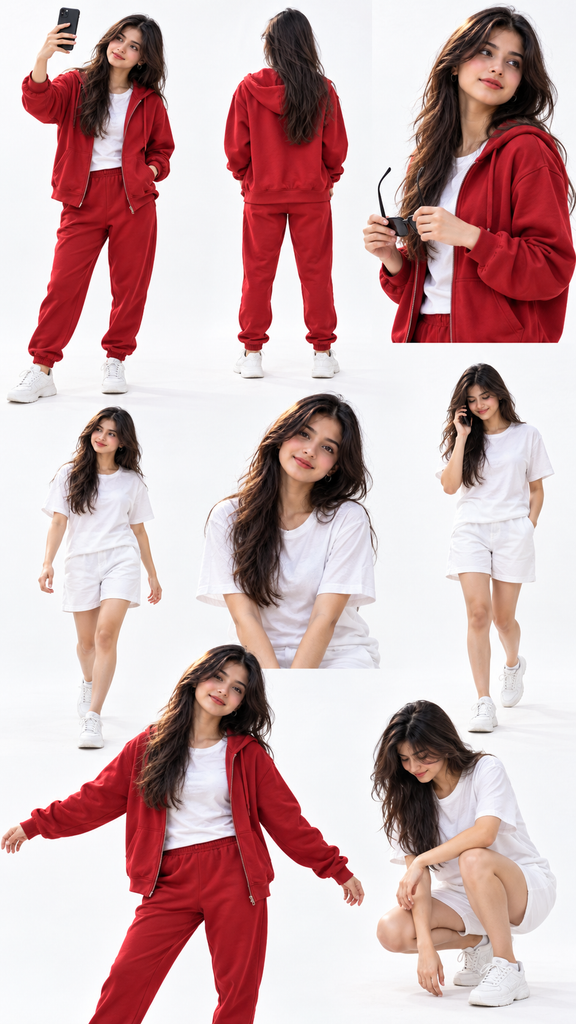
Create an ultra-realistic fashion lookbook photo collage using my uploaded reference photo as the ONLY identity reference. IMPORTANT: Preserve my exact original face, identity, facial features, skin tone, hairstyle, hair texture, and natural body proportions. Every person in the collage must be the same person from my uploaded photo. Do not change my face or create a different person. LAYOUT: Create a vertical 9:16 fashion lookbook collage featuring exactly 8 different poses of the same person, arranged in a clean, editorial magazine-style composition. Use a pure white seamless studio background with soft, natural studio lighting and realistic shadows. The composition should closely match a professional fashion catalog contact sheet. OUTFIT: Use a matching red zip-up hoodie, red jogger pants, a plain white crew-neck T-shirt, and clean white sneakers for the first outfit group. For the second outfit group, use a plain white crew-neck T-shirt, white shorts, and white sneakers. Keep the clothing realistic, with natural fabric folds, accurate stitching, and authentic textures. EXACT 8 POSES AND ARRANGEMENT: 1. TOP LEFT — Full-body front three-quarter view. Wearing the complete red tracksuit, holding a black smartphone up in one hand as if taking a selfie, looking toward the phone, with the other hand casually inside the hoodie pocket. 2. TOP CENTER — Full-body back view in the red tracksuit, standing naturally with the back facing the camera. Show the hoodie, hood, joggers, and white sneakers clearly. 3. TOP RIGHT — Waist-up side-profile portrait in the red tracksuit, holding black sunglasses in both hands, looking toward the right with a calm, confident expression. 4. MIDDLE LEFT — Full-body walking pose wearing a white T-shirt, white shorts, and white sneakers. Walking naturally toward the left, looking sideways, with realistic arm and leg positions. 5. MIDDLE RIGHT — Full-body walking pose in the same white outfit, holding a black smartphone against one ear as if talking on a phone call, looking slightly downward while walking. 6. BOTTOM LEFT — Three-quarter body pose wearing the red tracksuit, arms extended outward in a relaxed, playful fashion pose, smiling naturally and looking slightly to the side. 7. BOTTOM RIGHT — Low crouching pose wearing the white T-shirt and white shorts, head tilted downward, looking toward the ground, with realistic hands, knees, and body posture. 8. ADDITIONAL SMALL PORTRAIT — A natural candid fashion pose in the same coordinated outfit, with a relaxed expression and a slightly different angle, fitting neatly into the collage without disturbing the layout. COMPOSITION: Arrange the poses in a balanced, staggered editorial grid with generous white space between each figure. The top row should feature three poses, the middle row two full-body poses, and the bottom row two larger poses, with the additional small portrait integrated naturally into the remaining space. All eight poses must be visually distinct, correctly proportioned, and fully visible wherever possible. Avoid overlapping bodies. Maintain consistent lighting, camera perspective, face identity, and realistic clothing across all poses. PHOTOGRAPHY STYLE: Professional studio fashion photography, photorealistic skin texture, natural facial details, crisp fabric texture, soft shadows, high-resolution commercial catalog quality, realistic anatomy, natural hands and fingers, clean white background, sharp focus. STRICT RULES: – Use my uploaded photo to preserve my identity. – Do not alter my face, skin tone, or hairstyle. – Do not turn me into a different person. – Do not add extra people. – No cartoon, anime, illustration, or artificial-looking skin. – No unnecessary accessories or random clothing changes. – No text, logos, watermarks, borders, or decorative graphics. – Keep the overall look as close as possible to the supplied reference collage. OUTPUT: Vertical 9:16 image, ultra-realistic, high resolution, professional fashion lookbook collage..
 ChatGPT
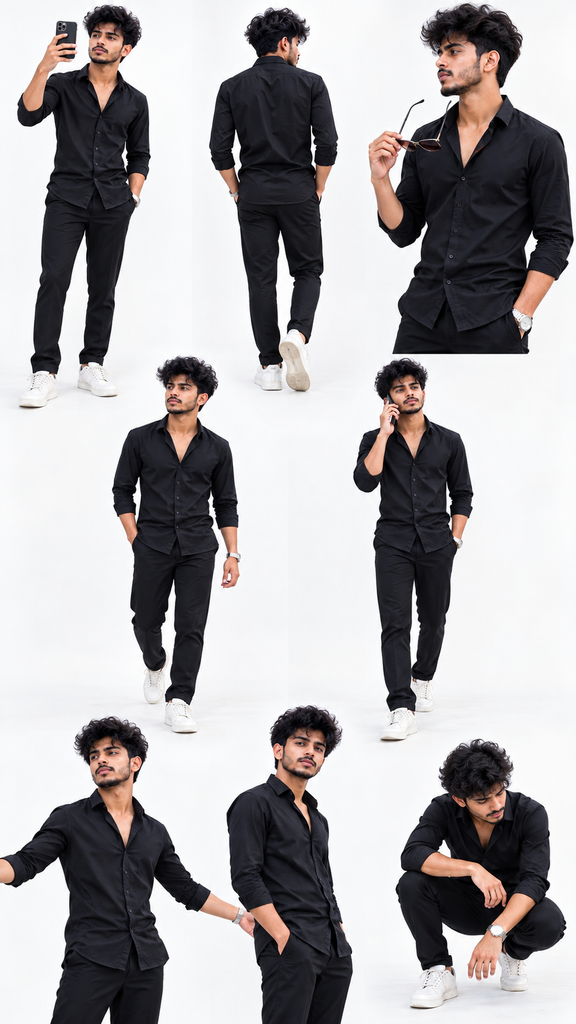
Create an ultra-realistic, professional fashion lookbook photo collage using my uploaded photo as the ONLY identity and outfit reference. IMPORTANT: Analyze the uploaded photo automatically. The subject is a male. Preserve the exact same person, original face, facial features, skin tone, hairstyle, hair texture, and natural body proportions. OUTFIT PRESERVATION — EXTREMELY IMPORTANT: The boy must wear EXACTLY the same outfit he is wearing in the uploaded reference photo. Automatically identify and preserve his original: – Shirt, T-shirt, hoodie, jacket, or other upper-body clothing. – Pants, jeans, shorts, or other lower-body clothing, if visible. – Original clothing colors, patterns, prints, and designs. – Shoes and accessories, if visible. – Fabric texture, fit, and overall styling. DO NOT change his outfit. DO NOT introduce new clothes. DO NOT change clothing colors. DO NOT replace his original outfit with a tracksuit or any other fashion style. If some clothing details are not visible in the reference, use the most consistent interpretation of the original outfit. LAYOUT: Create a vertical 9:16 fashion lookbook collage featuring EXACTLY 8 different poses of the SAME male person, arranged in a clean, staggered editorial grid on a pure white studio background. POSES AND ARRANGEMENT: 1. TOP LEFT: Full-body front three-quarter pose, casually taking a selfie with a smartphone, looking toward the phone. 2. TOP CENTER: Full-body back view, showing the back of his ORIGINAL outfit. Maintain realistic clothing details and body proportions. 3. TOP RIGHT: Waist-up side-profile pose, holding a pair of sunglasses and looking toward the side. Keep his original outfit unchanged. 4. MIDDLE LEFT: Full-body natural walking pose, looking slightly to the side, with relaxed arms and realistic leg positions. 5. MIDDLE RIGHT: Full-body walking pose, holding a smartphone against one ear as if talking on a phone call. 6. BOTTOM LEFT: Relaxed, confident fashion pose with arms extended outward, looking slightly to the side with a natural expression. 7. BOTTOM RIGHT: Natural crouching pose, looking downward, with realistic hands, knees, and body posture. 8. ADDITIONAL POSE: A candid three-quarter-body fashion portrait with a natural expression and a slightly different camera angle. IDENTITY CONSISTENCY: Every figure must represent the exact same male person from the uploaded photo. Keep his facial identity, skin tone, hairstyle, hairline, and facial structure consistent across all eight poses. BACKGROUND AND PHOTOGRAPHY: Pure white seamless studio background, soft professional studio lighting, subtle natural shadows, realistic skin texture, accurate anatomy, detailed fabric textures, sharp focus, premium commercial fashion catalog photography. COMPOSITION: Arrange three poses across the top row, two full-body poses in the middle row, and three poses across the bottom area. Maintain balanced spacing, clean white gaps, and a professional editorial collage aesthetic. Avoid overlapping figures or cutting off important body parts. STRICT NEGATIVE INSTRUCTIONS: No face replacement. No identity changes. No different people. No forced outfit changes. No random clothing colors. No duplicated or extra limbs. No distorted hands or fingers. No cartoon effects. No artificial skin. No text, logos, watermarks, or decorative borders. FINAL OUTPUT: A highly realistic vertical 9:16 fashion lookbook collage containing exactly 8 distinct poses of the same male person, preserving his original identity and EXACT original outfit from the uploaded photograph..
7. FAQs
1. Lookbook AI Photo free mein kaise banaye?
ChatGPT aur Gemini ke available image-generation features try kar sakte ho. Free usage limits account ke hisaab se alag ho sakte hain.
2. Ek photo se multiple poses kaise banaye?
Apni clear photo upload karo aur prompt mein alag-alag poses likho. AI un instructions ke according collage banane ki koshish karega.
3. Kya ChatGPT aur Gemini dono se lookbook photo bana sakte hain?
Dono platforms ke image-generation features try kar sakte ho. Available options account aur feature access par depend karte hain.
4. Kya AI photo mein original face same rahega?
Prompt mein original face preserve karne ke liye clearly likho. Isse AI ko tumhari requirement samajhne mein help milti hai, lekin exact same face rehne ki guarantee nahi hoti.
8. Trending Keyword Ideas
- Lookbook AI Photo
- Lookbook AI Photo Editing Prompt
- ChatGPT Photo Editing Prompt 2026
- AI Lookbook Photo Generator
- Viral AI Photo Editing
- AI Photo Collage Prompt
- Multiple Pose AI Photo
- ChatGPT AI Image Prompt
- Instagram Lookbook AI Photo
- AI Fashion Photo Prompt
- ChatGPT Lookbook Prompt 2026
- AI Photo Editing Prompt
